
Can’t select the Photo Album Camera Roll from Instagram
Posted in daily
Tags :
I’m experiencing a minor, but annoying bug with my Camera Roll album on my iPhone. Sometimes the Camera Roll album is out of reach, stuck up at the top of the screen, under the window title (image on the right below). You can pull it down, but can’t select it as it pops back up.


I’m not quite sure when I started to run into this issue, but it occurs regulary since I’ve upgraded to iOS 4.3 on my iPhone 4. Instagram (one of my favourite apps) seems to trigger this issue when you select an image from your photo library.
As anybody else experienced this?
A workaround is to quit the Photos app from the active apps bar and switching back to Instagram. Nevertheless, once triggered, this issue can occur from within the Photos app too.
Otherwise, I just discovered that the Photo Album when accessed from the Camera app (left image below) displays sorting tabs to select photos or videos only. This would be handy from within the Photos app, but there’s probably a screen real estate problem.
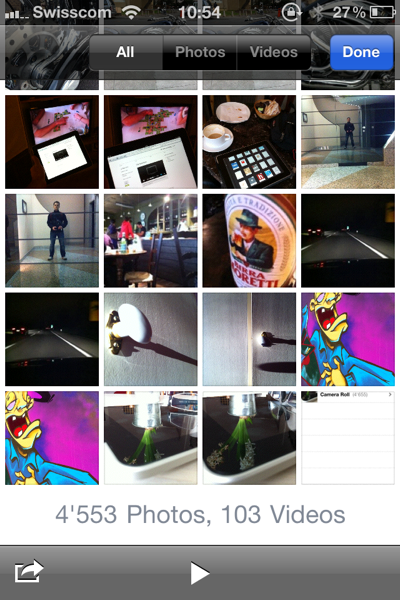
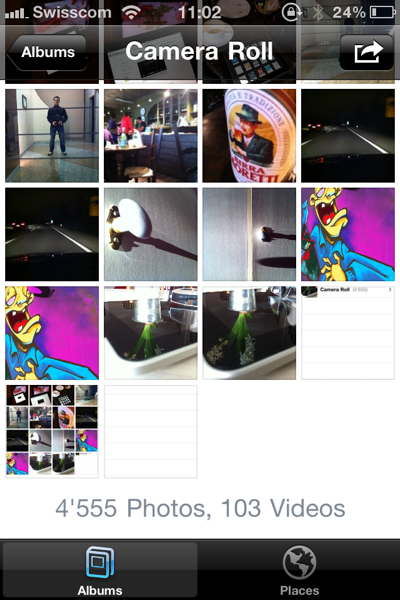
Thought I’d share these two snippets of info with you.
Comments and responses
19 Mar 2011
See this link from Apple for a solution – I had the same problem. Jesi900 answers it:
http://discussions.apple.com/thread.jspa?threadID=2783772&tstart=0
20 Mar 2011
Thanks for your comment and for the link Chris.
I came to the same conclusion, and that’s what I’d meant by “quitting the Photo app from the active apps bar”.
:)
19 Jun 2011
I am having the same issue. I just discovered it today. It is annoying. I just updated my iPhone, so I think that’s what made it start occurring. I hope they fix this problem soon.
26 Jun 2011
David, the permanent solution is to do a soft reset of your phone. Hold down the ‘home’ button and at the same time press and hold the power button. The screen will go blank and then you’ll get the Apple logo. Give it a minute and you’ll get up your usual log in screen. That should sort it.
03 Jul 2011
Hi I pressed something when i viewed albums on my ipod touch generation 4 32 GB and when iviewed them again it had gone down and when i scroll up i cant tap on camera roll can you help me?
03 Jul 2011
i tapped on photos
07 Aug 2011
“ Double tap the home button to bring up the multi-tasking bar, tap & hold the “Photos” icon until it starts to wiggle, tap the red minus sign to close it. Tap the home button when finished. See if doing this fixes things. “
it works!
07 Aug 2011
@Denise
Confirmed. Thanks a bunch. I just did that and you’re right, it does work. Was wondering if this was going to be permanent, but… Yay.
For those new to iPods, home button is the square on the front, and the power button is on the top right of the iPod.
09 Aug 2011
@Denise, thanks so much! Worked!
17 Aug 2011
Same thing just happened to me.
My daughter showed me that I had to double-click
on the HOME button, hold down an icon, and shut
down the Photo app (and any other left open).
This will put the app right again.
22 Aug 2011
I had the same problem today-thanks for the help, Denise! It worked for me!!
24 Aug 2011
thanks so much for sharing!it worked!! this is sooo helpful
02 Sep 2011
@ Denise and anyone else who said how to fix this (: My god, thank youu so muchh, your a legend, i thought it was going to be stuck like that (: thankk you once again.
09 Sep 2011
This worked for me, but I agree Apple needs a fix
20 Sep 2011
Thank you sooooo much I was sooooo annoyed!!!
21 Sep 2011
I have just updated the instagram app and now when i use my own photos to filter and save, they wont save on my iphone photo album. How can i fix this?
21 Sep 2011
I have the same problem.my photos from instagram are not loading in camerarol:(
21 Sep 2011
I have the same problem.my photos from instagram are not loading in camerarol:(
21 Sep 2011
I was having the same problem with the photos not saving to my phone. Just toggled the switches back and forth in Settings. It’s working fine now!
http://help.instagram.com/customer/portal/articles/95752-photos-not-saving-to-camera-roll-on-iphone
05 Oct 2011
i can’t see some of photo on instagram with a new version2.1
please help
17 Oct 2011
I love this aspect of internet. Help is just a tap away. Thanks for the great fix on the hidden photos!
25 Oct 2011
Fixed the camera roll inaccessible problem. Thanks to all who post problems and solutions.
30 Oct 2011
Help please. On my iphone 4, when i tap on my camera roll i get booted out to my home screen so am unable to view my photos. Any info would be appreciated please.
01 Nov 2011
Thanks to Mike B#4 It worked, much better than going through the apple help manual. I used the home and power button at the same time. Turned off IPhone and restarted. There the camera was!!!
01 Dec 2011
How can i put apple logo in Instagram…..help anyone???
21 Dec 2011
I have this happen to me a lot… Thank you everyone for the help! I hate not being able to see my photos… Problem resolved, and I’m back to shamelessly copying other artists! XD
21 Dec 2011
I have this happen to me a lot… Thank you everyone for the help! I hate not being able to see my photos… Problem resolved, and I’m back to shamelessly copying other artists! XD
26 Dec 2011
On my iPod touch That I got just to day brand new I take a picture with the camera then it saves and erases right then. What should I do
26 Jan 2012
Hey guys. I have a huge problem. I just bought an IPhone 4 about a month ago. And for some reason when I go to view the photos I had taken. I can’t view them at all. Is there any way you guys can help me? Thanks
05 Feb 2012
turning phone off worked for me, thanks
05 Feb 2012
turning phone off worked for me, thanks
05 Feb 2012
turning phone off worked for me, thanks
20 Dec 2012
excuse me. im having a problem with my instagram app. i cant upload/post my pictures in instagram that comes from my camera roll :(( what should i do? when im trying to upload a pic, instagram would say i have to update the app. but there’s nothing to update cuz i already updated it. anyone can help me? thanks!
19 May 2014
where did you get the tutorial for fetching image from instagram and show it into camera roll..thank you.._
20 Dec 2014
I am having a problem on Instagram when I press the blue button with the camera on it it suddenly goes black and I can’t upload pictures it does the same when I try to do it on direct message pleas help if you do I will give you a shout out I am in a crises😦
03 Jul 2015
I’m having an issue viewing all my photos from my iPhone (I’m only able to see 40 plus photos and I have 400 plus photos) when I’m trying to access to upload from my instagram. This has never been an issue before until a few days ago.
19 Jul 2015
Please help I have an Instagram issue that’s driving me crazy!
When I go on Instagram to create a new photo, I only see five or so of my recent photo library photos. None of the others come up.
Has anyone else experienced this? I have tried a soft reset, deleting and re downloading the app, nothing is working!
Thank you
26 Jul 2015
Many answers here
https://discussions.apple.com/thread/6598470
19 Feb 2018
I have saved stories but can’t upload them to my Instagram account. The square which usually appears in the bottom left hand corner isn’t showing up. Help!
11 May 2018
Yes it happens to me in one of my accounts. (I have 2.) I even switched phones in between this time and it’s still the same. Both galaxies. But still, since the 2 accounts work differently, I’m sure it’s the account not any settings or phone updates. Very annoying